

Knowledge base › Survey guide
Survey guide
How do I set draft, index and sound velocity on the CEESCOPE™ or CEE ECHO™?
Measure the draft from the water surface to the transducer face and enter it for each frequency. Set the sound velocity from a calibrated probe or the built-in calculator, then confirm both with a bar check, and use the index offset only for the small constant difference that’s left. All three are critical settings, locked while a file is logging.
0–10 m draft and index range
1350–1750 m/s sound velocity range
2 ways enter the velocity, or calculate it
Locked while a file is logging
Three settings turn the echo sounder’s travel time into a true depth: the transducer draft, the sound velocity and the index offset. Set the draft and sound velocity first, confirm them with a bar check, and use the index offset only for the small constant difference that’s left.
All three are critical settings. The CEESCOPE™, CEESCOPE LITE™ and CEE ECHO™ lock them while a file is recording, so get them right before you press record. This applies to every frequency you use: the high frequency (E/S A) and the low frequency (E/S B) each have their own draft and index.
What do draft, index and sound velocity do?
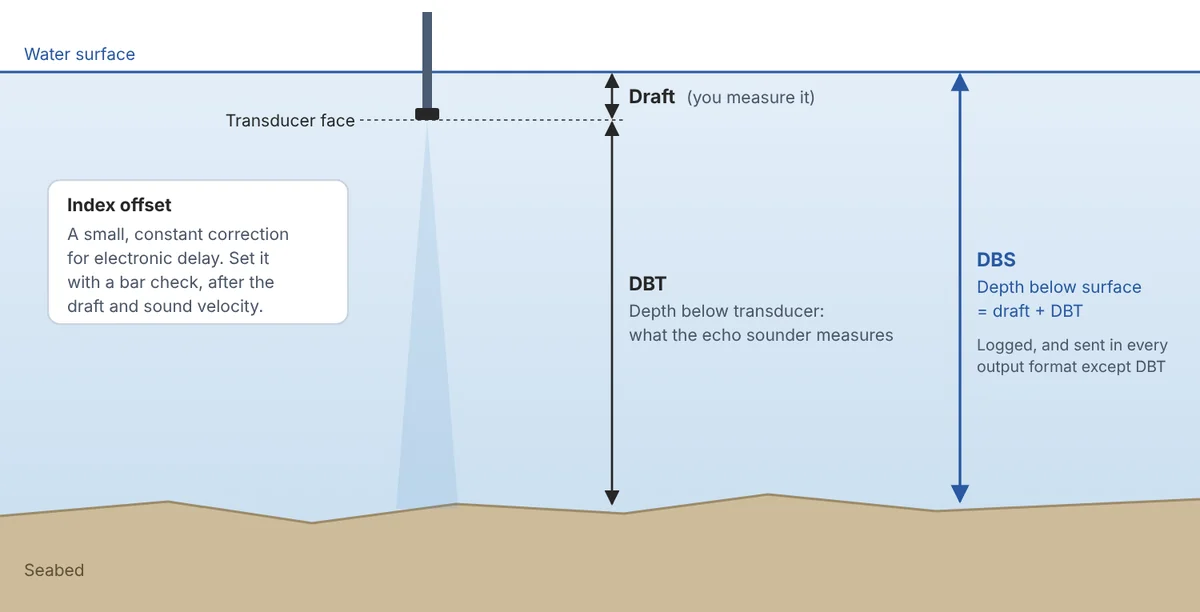
- Draft is the distance from the water surface to the transducer’s zero point, normally its face. The echo sounder adds it to the measured depth to give the depth below the surface (DBS). DBS is what’s logged and sent in every real-time format except DBT (depth below transducer).
- Sound velocity scales every depth. Depth is the sound velocity multiplied by half the echo’s travel time, so a 1% error in sound velocity is a 1% error in depth: about 10 cm at 10 m.
- Index offset corrects the small electronic delay between the echo sounder and the transducer. It’s the same at every depth, and may change if you use a different transducer.
How do I set the draft?
Measure from the water surface to the transducer face with the boat loaded as it will be for the survey. The draft usually changes between vessels, so check it before every survey. Mark the transducer pole at the water line too, so you can see if it slips.
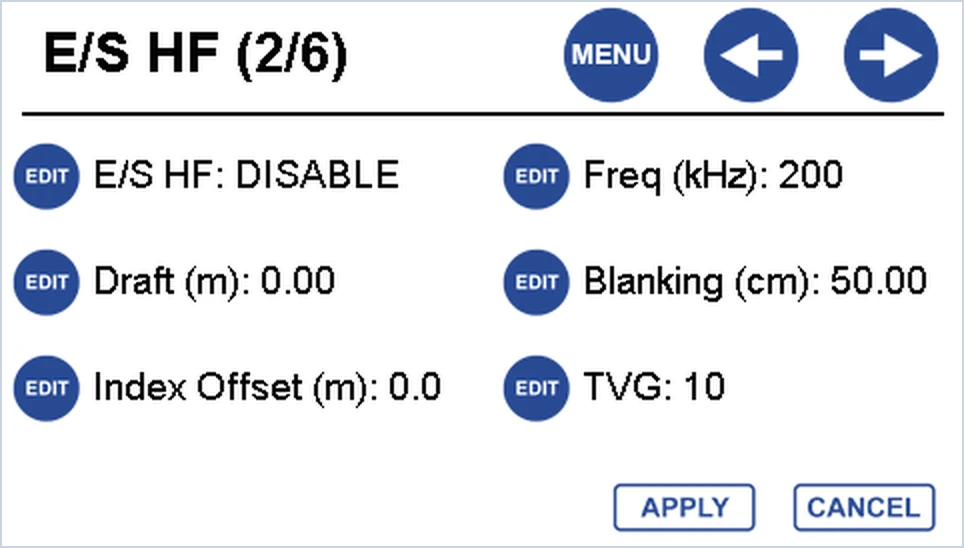
- Press MENU → E/S → RIGHT to open page 2/6 (high frequency). For the low frequency, press RIGHT twice more to page 4/6.
- Press EDIT next to Draft (m) and type the draft in metres (0–10 m).
- Press ENTER. The value turns red until you press APPLY; it turns black once it’s applied.
Apply before you move on. If you change pages while a value is still red, the change is not applied.
How do I set the sound velocity?
The sound velocity is on the common page, page 1/6, and applies to both frequencies. Press MENU → E/S and set S/V Mode to one of two options:
- MANUAL: enter a value from a calibrated sound velocity probe in S/V (m/s), from 1350 to 1750 m/s. This is the most accurate option.
- Calculator: enter the Water Temp and Salinity (PPT), and the echo sounder works out the sound velocity using Coppens’ equation at a reference depth of 10 m.
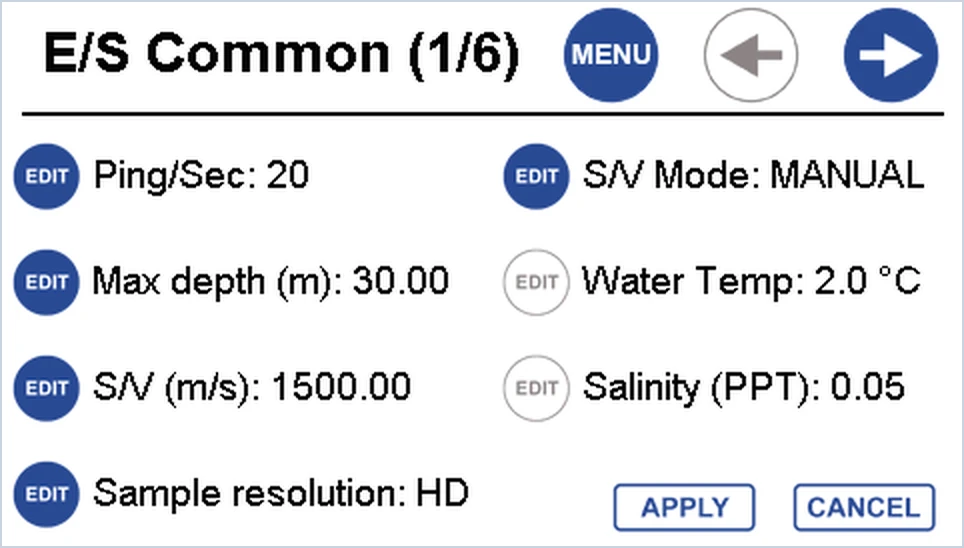
Check the sound velocity before, during and after the survey. Temperature and salinity can change with the tide, or as you move near a tributary. If you have no probe and no reliable temperature and salinity, the bar check can find a working value: see how do I do a bar check?
Typical sound velocity by water temperature
A quick reference from Coppens’ equation at 10 m depth, for sea water (35 PPT salinity) and fresh water (0.5 PPT). Use it to sanity-check a calculated or measured value.
| Water temperature | Sea water (m/s) | Fresh water (m/s) |
|---|---|---|
| 0 °C (32 °F) | 1449.2 | 1403.2 |
| 2 °C (36 °F) | 1458.2 | 1413.0 |
| 4 °C (39 °F) | 1466.7 | 1422.4 |
| 6 °C (43 °F) | 1474.8 | 1431.3 |
| 8 °C (46 °F) | 1482.6 | 1439.9 |
| 10 °C (50 °F) | 1489.9 | 1448.0 |
| 12 °C (54 °F) | 1497.0 | 1455.7 |
| 14 °C (57 °F) | 1503.6 | 1463.1 |
| 16 °C (61 °F) | 1509.9 | 1470.1 |
| 18 °C (64 °F) | 1515.9 | 1476.8 |
| 20 °C (68 °F) | 1521.5 | 1483.1 |
| 22 °C (72 °F) | 1527.0 | 1489.1 |
| 24 °C (75 °F) | 1532.1 | 1494.7 |
| 26 °C (79 °F) | 1536.9 | 1500.1 |
| 28 °C (82 °F) | 1541.4 | 1505.1 |
| 30 °C (86 °F) | 1545.6 | 1509.9 |
| 32 °C (90 °F) | 1549.7 | 1514.4 |
| 34 °C (93 °F) | 1553.4 | 1518.6 |
How do I set the index offset?
Only after the draft and sound velocity are right. Do a bar check with the plate at 1–2 m: if the displayed depth still differs from the known plate depth, enter the difference as the index offset so the two match.
- On page 2/6 (high frequency) or 4/6 (low frequency), press EDIT next to Index Offset (m).
- Type the correction in metres (0–10 m) and press ENTER, then APPLY.
You can also enter the index offset from inside the Bar Check tool.
Transducer above the water line? If the transducer sits above the water in a wet well or similar, an index offset can act as a negative draft correction. The depths are then referenced to a point the set distance below the transducer face.
Constant error or growing error? The index offset is the same at every depth. If the difference grows as the water gets deeper, the sound velocity is wrong, not the index.
Which settings must not change during a survey?
Critical settings change the logged data, so the echo sounder won’t let you edit them while a file is recording. Changing the draft mid-survey, for example, would shift every following depth up or down by the difference. Set them, bar check, then log.
| Setting | Critical? | What to check before logging |
|---|---|---|
| Echo sounder setup (single or dual frequency) | Yes | Both channels set up if you’re using a dual frequency transducer |
| Sound velocity and S/V mode | Yes | Manual value or calculator inputs entered, and confirmed by a bar check |
| Draft and index offset | Yes | Entered for each frequency in use, and confirmed by a bar check |
| Position source | Yes | Internal or external GNSS selected; RTK corrections set up if used |
| GNSS antenna height (RTK) | Yes | Entered correctly |
| Heave and tide inputs | Yes | Enabled if the survey uses them |
| Date and time | Yes | Correct for UTC or local time |
| Max depth | No | Can be changed while logging |
| Blanking distance | No | Can be changed for each frequency while logging |
| Real-time output | No | Can be changed while logging |
Using an external GNSS receiver? Set it up fully before connecting it. The echo sounder only shows an error when no valid position arrives; it won’t warn you if the position quality drops. Watch the quality value shown under POSITION on the home screen. RTK corrections sent to the echo sounder are not applied to external position data.
Related guides
Equipment used
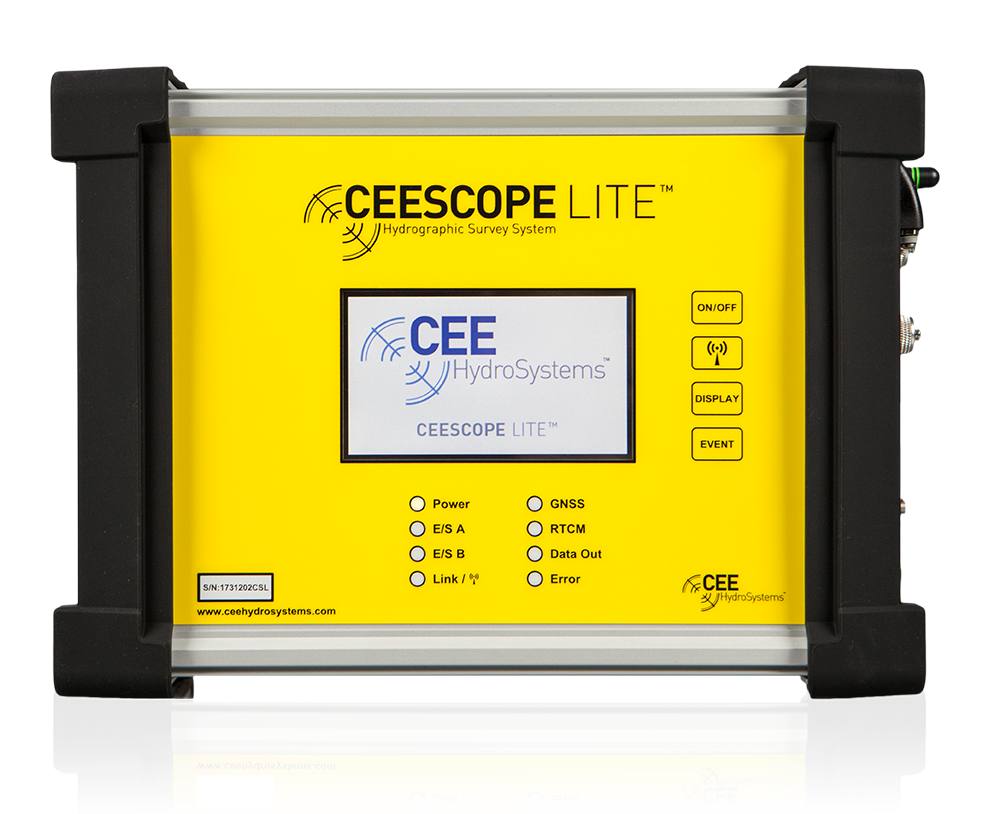
Single Beam Echo Sounder with Built-in GNSS
CEESCOPE LITE™
The whole CEESCOPE, in an even smaller footprint
View product
Talk to US
Need a hand with your set-up?
Our engineers answer survey questions every day.