

Knowledge base › Survey guide
Survey guide
How do I use Trimble RTX with the CEESCOPE™?
CEESCOPE™ echo sounders with the Trimble BD990 or BD9250 receiver can use Trimble CenterPoint RTX corrections, delivered by L-Band satellite, so you can survey with a single antenna and no base station or network / VRS connection. On the BD9250, keep the factory default L1 / L5 setting for RTX, and allow 5–10 minutes after start-up before you start surveying.
2.5 cm RTX precision
0 base stations needed
L1 / L5 BD9250 default for RTX
5–10 min wait after start-up
What is CenterPoint RTX?
Trimble CenterPoint RTX is a subscription corrections service delivered by L-Band satellite. It gives precise position and elevation without a local base station or an internet network / VRS corrections stream, so a single antenna is all you need.
Because it is a single antenna solution, achievable accuracy is somewhat lower than conventional RTK. For many applications, though, RTX elevation data is accurate enough to use for real-time tide / level correction in hydrographic surveying.
On the CEESCOPE™ RTCM menu, SATELLITE denotes Trimble RTX. The subscription date is shown on the RTCM screen, and the subscription must be active to receive RTX corrections.
BD990 or BD9250: what’s the difference?
| Receiver | Frequency bands | What you need to do |
|---|---|---|
| Trimble BD990 | L1, L2 and L5, all active | Nothing. RTX and RTK performance is always maximised. |
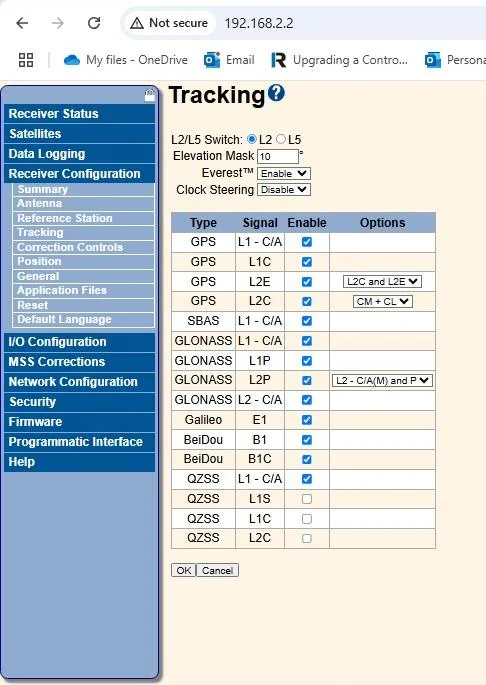
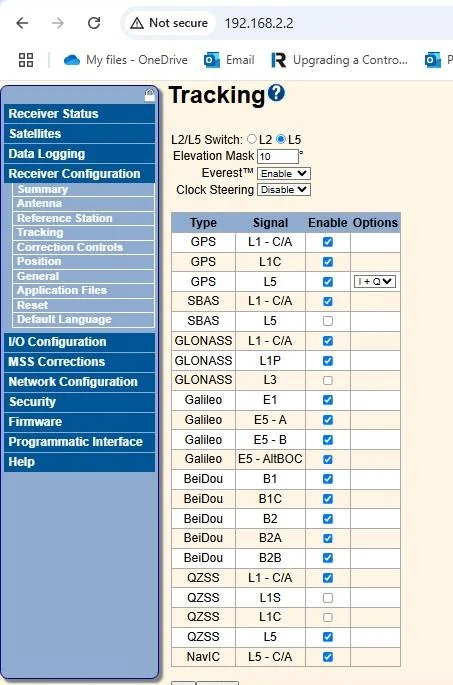
| Trimble BD9250 | L1 + L2 or L1 + L5 (not L2 and L5 together) | Choose L2 or L5 to suit your corrections source. |
Should I select L2 or L5 on the BD9250?
For RTX, always use the factory default L5 selection. If you only plan to use RTX corrections, there is nothing more to do. The L5 band is inherently more accurate and performs better in multipath environments.
If you use network / VRS corrections over the internet (NTRIP), check whether the incoming stream includes L5 corrections. Some streams only use L1 and L2, especially free services.
No RTK fix? If the BD9250 is set to L1 / L5 and your corrections stream is L1 / L2, the position solution will never reach RTK FIX. Switch the receiver to L2.
How to switch between L2 and L5
- Connect to the CEESCOPE™ with an Ethernet cable as usual.
- Type the GNSS IP address
192.168.2.2into any browser. No internet connection is needed. - Log in with user
adminand passwordpassword. - Go to Receiver Configuration › Tracking and set the L2 / L5 switch.
The selected band is kept after the CEESCOPE™ is power-cycled.
How accurate is RTX? Test results
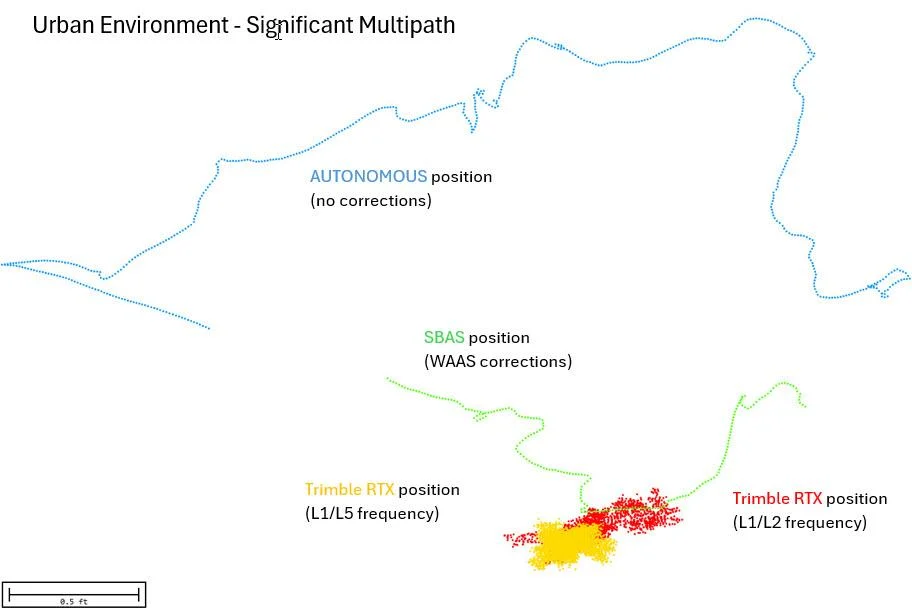
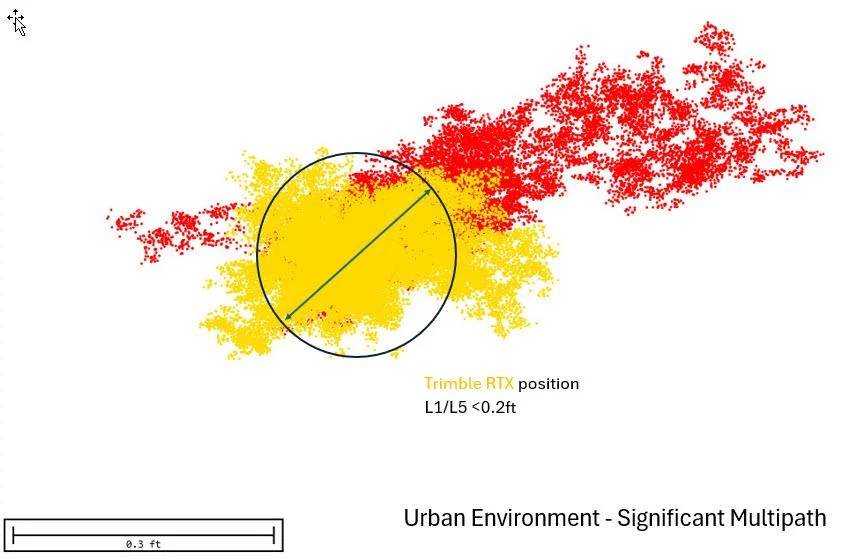
To show the performance you might expect, a CEESCOPE™ 9250 was set up with a deliberately poor antenna position close to buildings and trees, approximating real-world sub-optimal conditions. The receiver ran for several hours in different modes.
- CenterPoint RTX position was excellent compared with autonomous (uncorrected) and SBAS (WAAS) positions.
- A basic L1 / L2 network RTK solution (11–13 satellites) showed only slightly lower point spread than RTX L5.
- RTX L1 / L2 showed more scatter than L1 / L5, most likely because of the high-multipath test site.
Open-water performance during a survey will likely be better than these results, with more satellites in view and less multipath. Over a longer test, the autonomous and SBAS points would have kept spreading over a much larger area.
Elevation accuracy
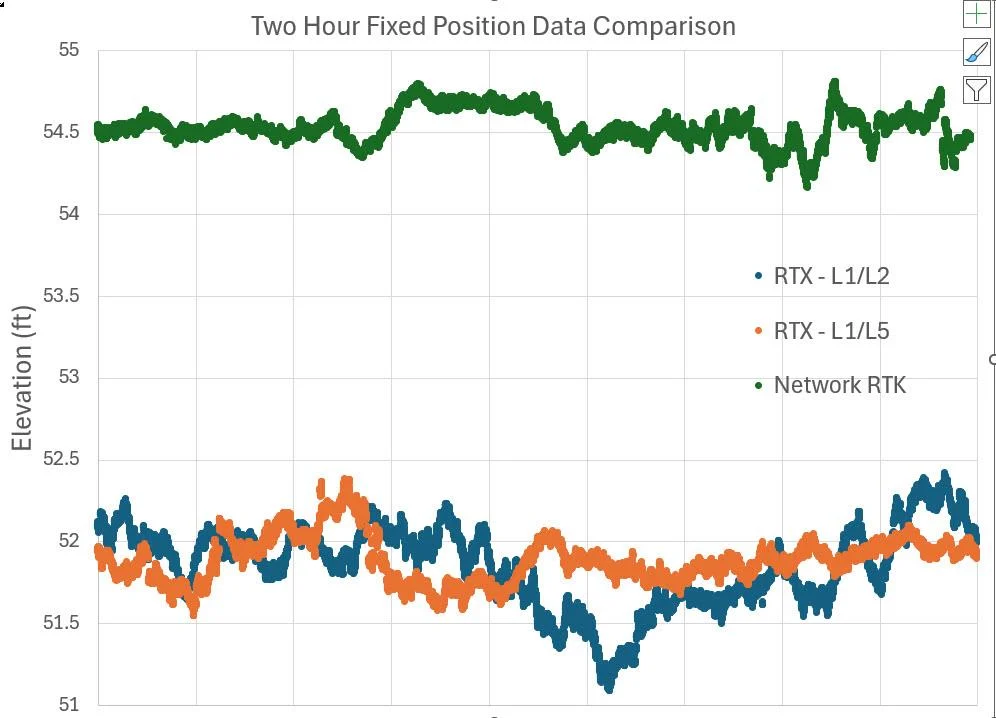
L2 and L5 RTX elevations were compared with basic L1 / L2 network RTK. Both were less precise than network RTK, but L5 RTX came close. The elevation datums were different, which is why there is an offset between the RTX and network RTK results.
How does RTX show in survey software?
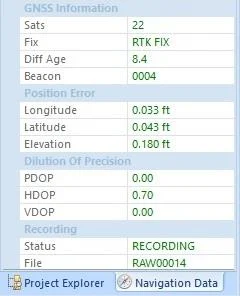
When properly converged, RTX is output as an RTK Fixed GNSS message with a GGA quality code of 4, so software such as Hydromagic shows RTK FIX. The differential age should stay under 10 seconds, and the latitude / longitude position error should typically be under 0.05 ft with a fully converged RTX solution.
How long does RTX take to converge?
RTX does not reach full accuracy until some time after power-up, and the time varies by location, with the fastest convergence in North America and Europe. In those regions the RTX FIX is typically shown after about 1 minute, but accuracy is not yet at its best. In the test below, a further 3 minutes passed after RTX FIX before the position was accurate.
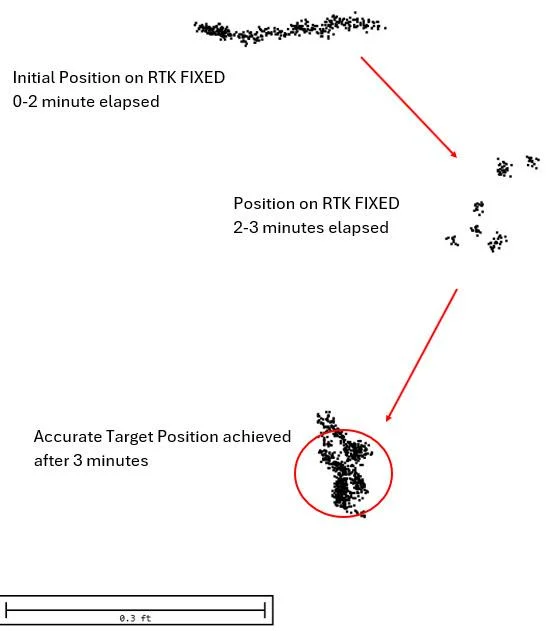
Recommendation: allow 5–10 minutes after CEESCOPE™ start-up before you start surveying, and watch the position error values to make sure accurate data is recorded.
How do I activate or renew the RTX subscription?
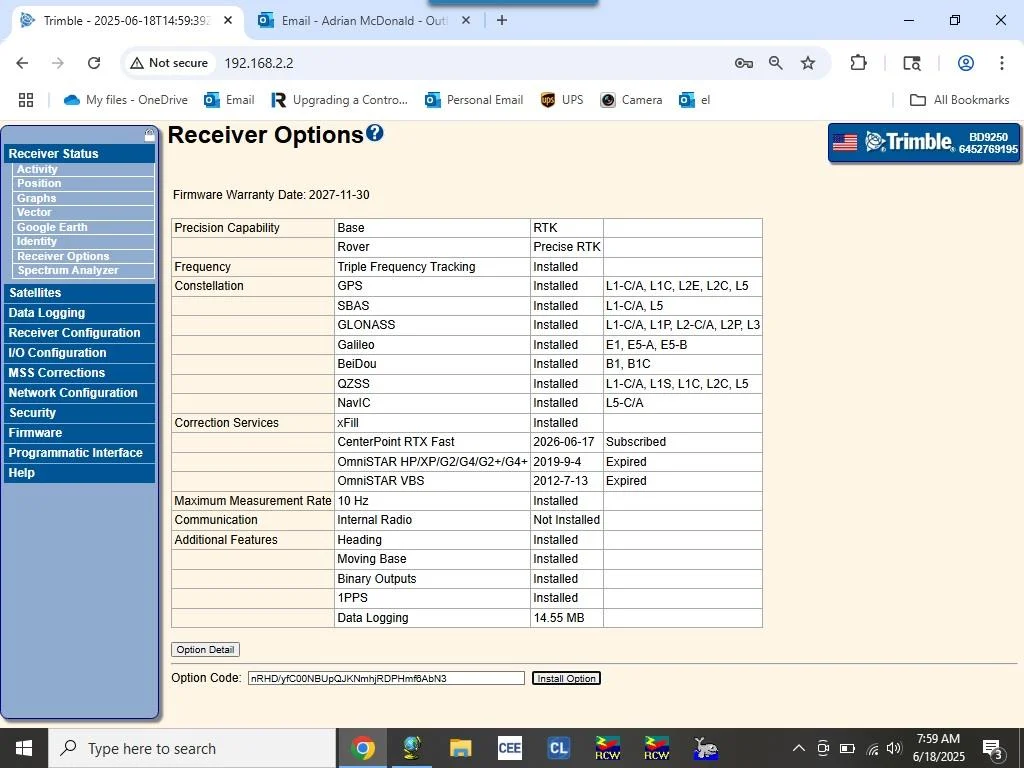
CEESCOPE™ echo sounders with Trimble GNSS receivers come with a one-year CenterPoint RTX subscription. It is either activated at the CEE factory before shipping, or you activate it yourself when you want the year to start, using an activation code from CEE HydroSystems (or Trimble).
- Open the Trimble GNSS browser interface at
192.168.2.2. - Go to Receiver Status › Receiver Options.
- Paste the activation code into the Option Code field.
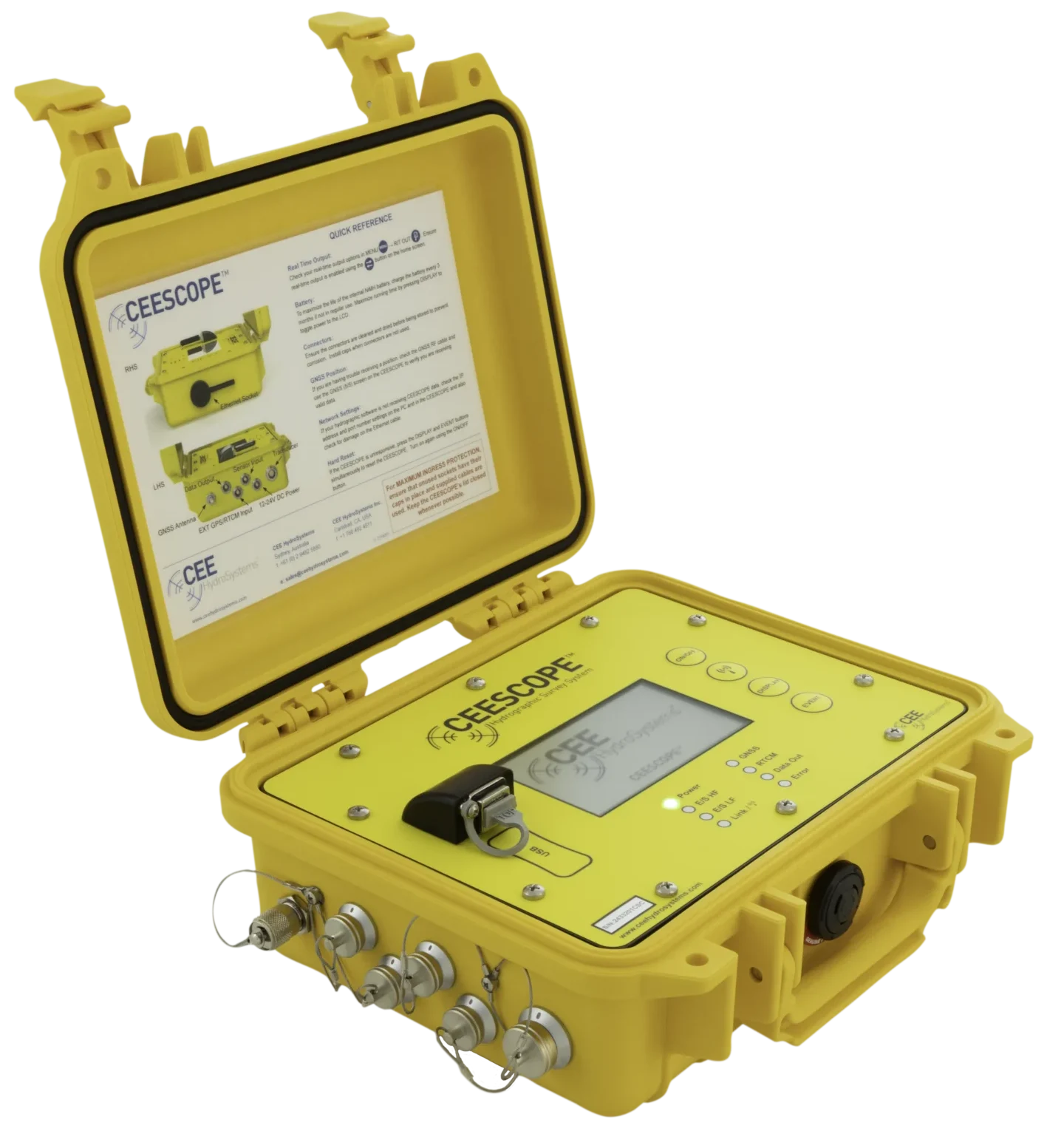
Equipment used
Talk to US
Need a hand with your set-up?
Our engineers answer survey questions every day.