

Knowledge base › Survey guide
Survey guide
Why won’t my CEESCOPE™ get an RTK fix?
Most RTK problems on the CEESCOPE™ come from a mismatch: a corrections format your receiver can’t use, a network login that looks right but isn’t, or a UHF radio set differently from the base. If you see RTK FLOAT, corrections are arriving and your radio or network is fine; the fix is better sky view and less multipath.
RTCM 3.xworks with any receiver
Float = 5corrections arriving
Fixed = 4cm accuracy
2separate UHF settings to match
Why does the corrections format matter?
RTK-equipped CEESCOPE™ echo sounders take real-time corrections from a UHF base station or a network RTK / VRS (virtual reference station). If the format or transmission settings don’t match, corrections may not arrive at all, or the fix may be inconsistent.
RTK needs the rover and base to see the same satellites, so the more satellites you can use, the better. As constellations and frequencies have been added, corrections messages have grown, while UHF radios still have limited data (baud) rates. Compact messages let the radio reach further or carry more constellations from the base.
Which RTK formats are there?
However corrections reach you, they use one of these message formats:
| Format | What it is |
|---|---|
| RTCM 3.x | Industry standard. Works with any GNSS receiver and includes all constellations. |
| CMR | Older Trimble format, originally proprietary, now rarely used. |
| CMR+ | An improved, compressed version of CMR. |
| CMRx | Highly compressed Trimble format for Trimble receivers only. The highest performance option, with all constellations. |
| RTX | Not an RTK format but a corrections service, using CMRx messages that can be sent by L-Band satellite. See using Trimble RTX with the CEESCOPE™. |
Which format should I use with my receiver?
Over an internet connection, bandwidth is rarely a constraint, but receiver compatibility still matters.
| CEESCOPE™ receiver | Use | Avoid |
|---|---|---|
| Trimble | Any format | — |
| NovAtel | RTCM 3.x | CMRx can’t be selected. CMR+ works but is GPS only (no GLONASS), giving far fewer satellites. |
Why won’t my network RTK stream connect?
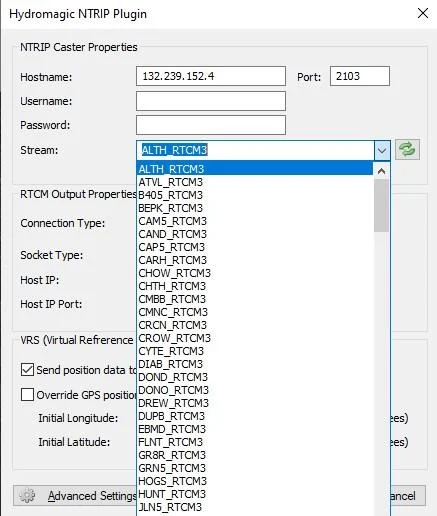
A network RTK provider needs a web or IP address plus a username and password. You can choose streams from individual base stations or a virtual reference network, often with different format options. Virtual reference networks need you to send your position to the server.
A populated list doesn’t mean you’re logged in. The list of available corrections usually appears even with a wrong (or no) username and password. With a wrong login, the stream you select simply fails to arrive.
How do I set up the UHF radio?
The CEESCOPE™ can include a built-in Satel UHF radio (403–470 MHz) for corrections from a local base. The radio is a separate module from the GNSS receiver and must be set to match the base station. The radio protocol and the RTK format are separate settings, and both must match.
| Setting | Set to |
|---|---|
| Frequency | The same as the base. |
| Channel spacing | Typically 12.5 kHz = 4800 baud and 25 kHz = 9600 baud, but this depends on the protocol. |
| Modulation | Match the base radio: TrimTalk (Trimble radios), Pac Crest or Satel. |
Modulation strongly affects range and RTK quality, because it limits how much corrections data gets through. Pacific Crest FST runs 9600 baud at 12.5 kHz spacing, while TrimTalk V1 is limited to 4800 baud at 12.5 kHz.
Fix keeps dropping on UHF? If the base outputs too many constellations, the corrections packet can’t be fully received in each interval and RTK suffers badly. Turn off constellations on the base output until the fix is stable.
What does RTK Float vs Fixed tell me?
| Status | GGA code | Meaning |
|---|---|---|
| FLOAT | 5 | Corrections are being received and processed, but the ambiguities aren’t resolved to integers yet. |
| FIXED | 4 | Ambiguities resolved to integers, with centimetre accuracy. |
FLOAT is a useful diagnostic: it proves corrections are arriving, so the UHF radio or network link is working. For example, a CEESCOPE™ RTK in Australia logged into a European network will show FLOAT, even though it will never reach FIXED.
Stuck on FLOAT? Your radio or network setup is not the problem. Rover position quality is too low: increase the number of visible satellites or move away from multipath, and the solution will usually reach FIXED.
Equipment used
Talk to US
Need a hand with your set-up?
Our engineers answer survey questions every day.