

Knowledge base › Survey guide
Survey guide
Introduction to GNSS Positioning Corrections
Without corrections any GNSS receiver is only good to 3–5 m. Free SBAS gets you to about 1 m, subscription PPP (L-Band) down to 2.5 cm with no base station but a convergence wait, and RTK, from a network over the internet or your own base station over UHF, gives under 1 cm horizontal and 1.5 cm vertical. For tide correction or water level monitoring, RTK is usually the only option.
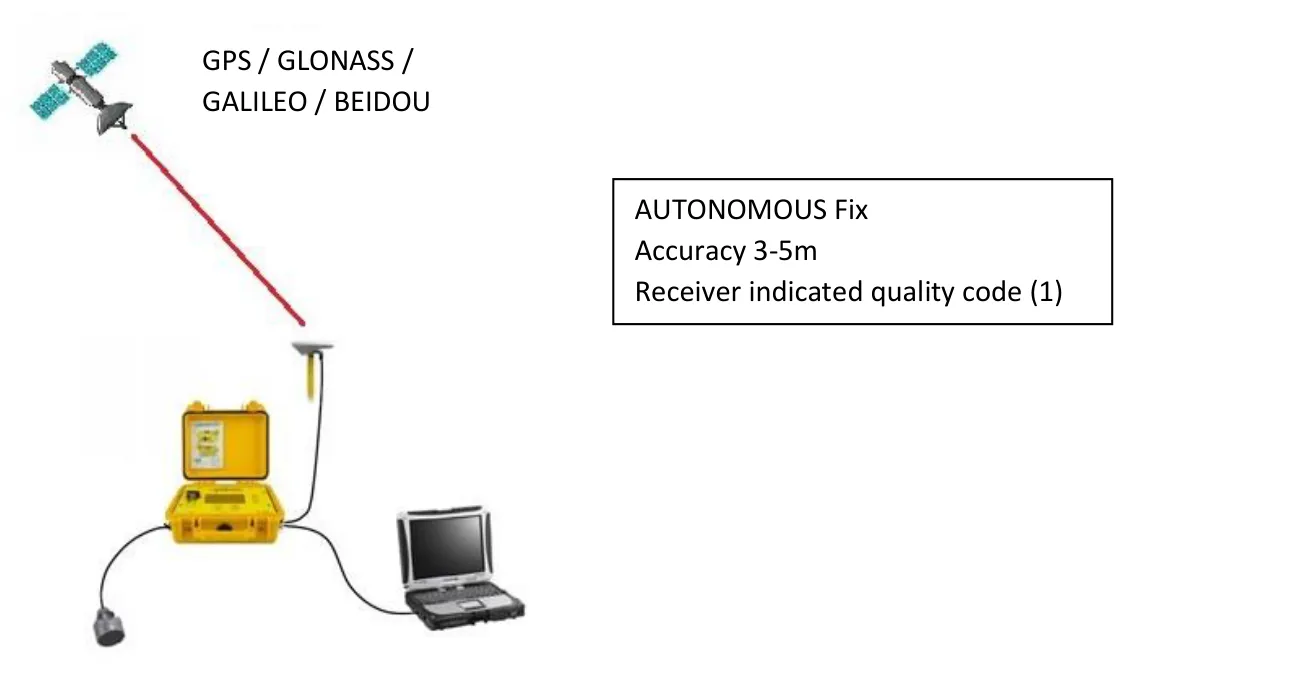
3–5 m autonomous
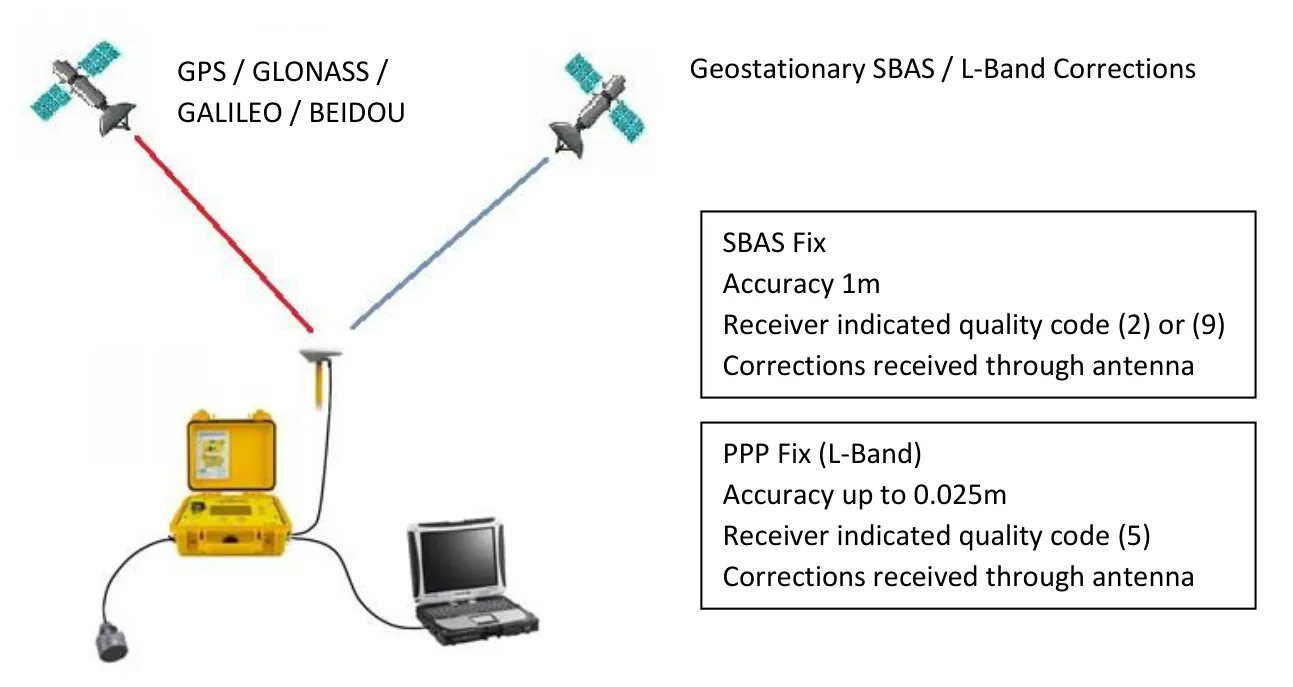
1 m SBAS
2.5 cm best PPP (L-Band)
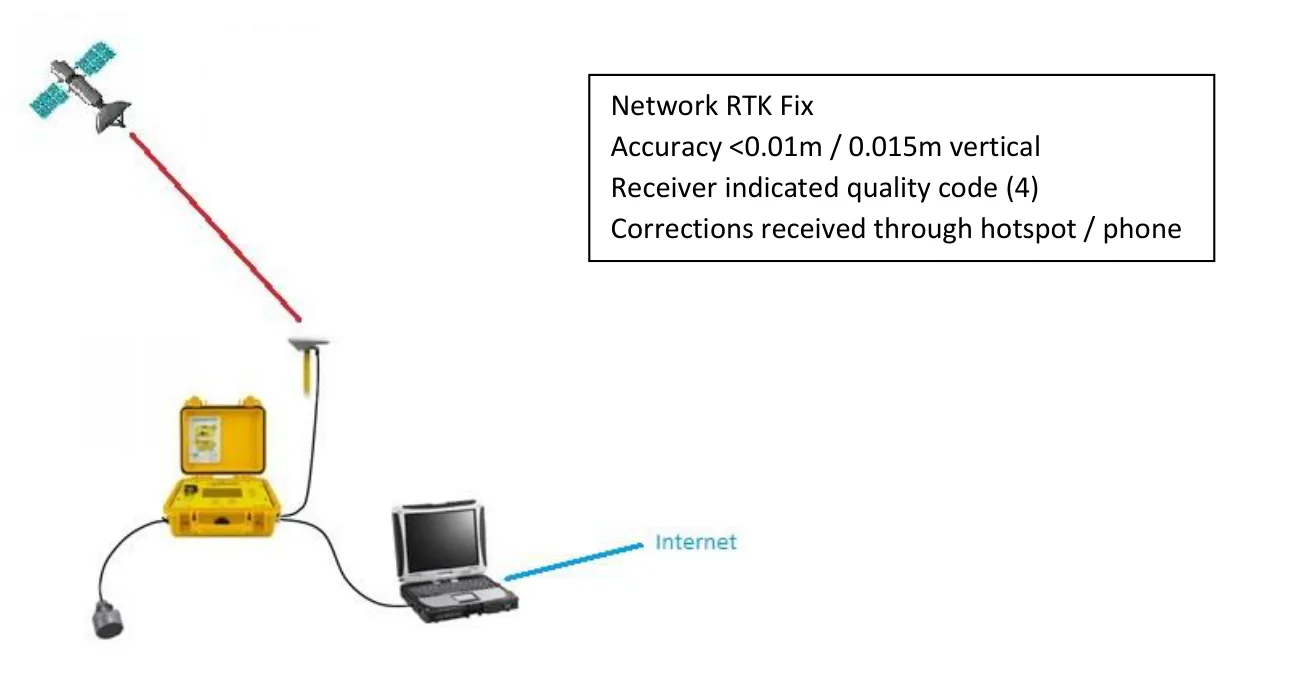
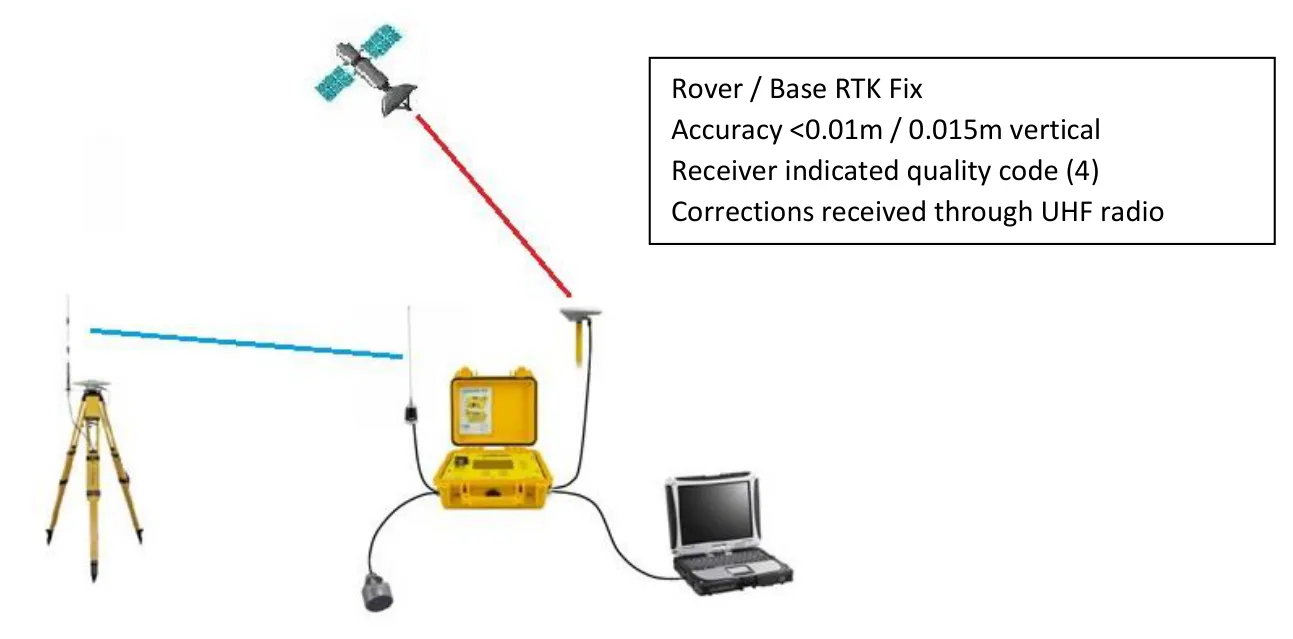
<1 cm RTK horizontal
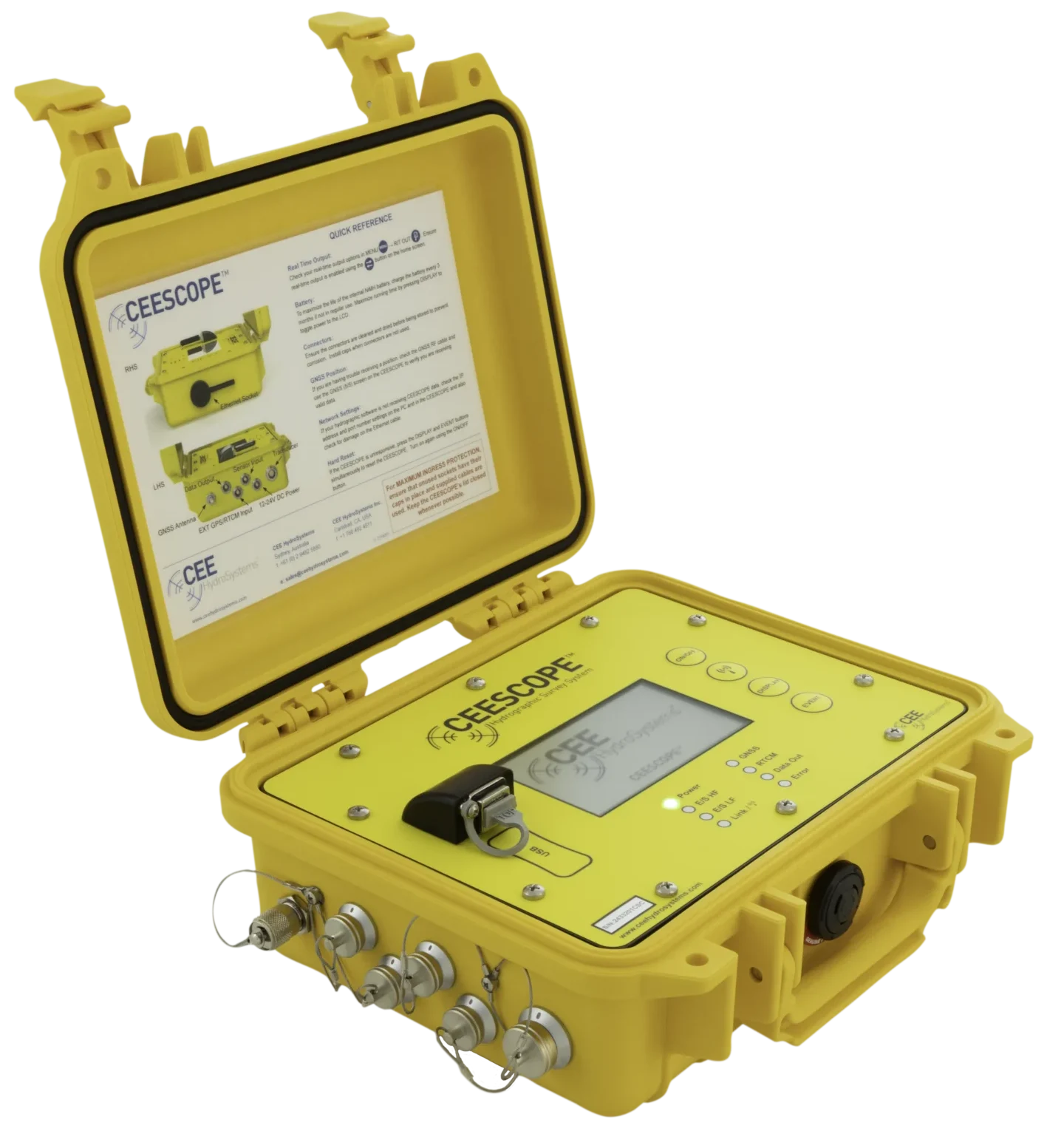
Every GNSS receiver, including those in the CEESCOPE™, is quite inaccurate without correction signals to remove errors caused by the atmosphere. Knowing the options helps you choose the right equipment.
How do the options compare?
| Method | Accuracy | Quality code | Corrections come via |
|---|---|---|---|
| Autonomous | 3–5 m | 1 | None |
| SBAS | ~1 m | 2 or 9 | GNSS antenna (geostationary satellite) |
| PPP (L-Band) | Up to 0.025 m | 5 | GNSS antenna (geostationary satellite) |
| Network RTK | <0.01 m / 0.015 m vertical | 4 | Internet: hotspot or phone |
| Base / rover RTK | <0.01 m / 0.015 m vertical | 4 | UHF radio |
Autonomous GNSS
GNSS is the general term for GPS and the similar satellite constellations run by other countries (GLONASS, Galileo, BeiDou). More satellites mean better accuracy and better resilience when trees or buildings block the sky. But without corrections, any receiver is only good to about 3–5 m, even with many satellites in view, mainly because the signal is distorted passing through the atmosphere.
SBAS
Atmospheric errors vary with location, so corrections must be specific to where the receiver is; the closer the correction is made, the more accurate it is. Free SBAS (Satellite Based Augmentation System) signals were introduced mainly for commercial aviation; the first was WAAS in the USA. Any modern GNSS receiver can use SBAS.
A network of ground stations (38 for WAAS) continuously compares its computed position with its known position. The combined differences give a correction that varies with the receiver’s position in the network, broadcast from a separate geostationary satellite. At higher latitudes that satellite sits low in the sky, so you need a clear view to the south (or north in the southern hemisphere).
PPP (L-Band) corrections
SBAS only uses the L1 (low precision) frequency, so it can’t reach survey grade, and it doesn’t cover the whole world. Subscription Precise Point Positioning (PPP) services from GNSS manufacturers work on the same principle (ground stations relay corrections to a geostationary satellite, which broadcasts them on the L-Band frequency), but with much greater precision and worldwide coverage. The satellites sit over the equator at different longitudes and are separate from the positioning satellites.
- Single antenna: no base station or internet connection, which suits remote sites.
- Convergence time: up to 30 minutes (depending on the service) before the stated accuracy is reached. Until then, the receiver shows a non-precision position.
- Clear sky view to the corrections satellite is critical: there are only one or two, unlike the dozens of positioning satellites. This gets harder at high latitudes as the satellite nears the horizon.
- Distance from ground stations matters: stations aren’t evenly spaced, and accuracy drops further away from them.
- L1 / L2 needed: higher accuracy PPP (and RTK) needs the L2 frequency activated on the receiver and an L1 / L2 antenna. Antennas supplied with CEESCOPE™ kits are usually L1 / L2.
- Services are geo-gated to land and the near-shore coastal zone; offshore signals are managed separately at higher cost. Subscriptions run from about a month up to five years.
PPP services on the CEESCOPE™
| Service | CEESCOPE™ receiver | Levels | Accuracy |
|---|---|---|---|
| Hemisphere Atlas® | Hemisphere (e.g. Phantom) | Atlas BASIC, lifetime, included | 0.5 m horizontal |
| Atlas H30, month / annual | 0.3 m horizontal | ||
| Atlas H10, month / annual | 0.08 m horizontal (0.2–0.3 m vertical) | ||
| Trimble CenterPoint® RTX | Trimble BD990 or later (e.g. BD9250) | Month / annual | 0.025 m horizontal / 0.05 m vertical |
| NovAtel TerraStar® | NovAtel OEM628, OEM729 or later | TerraStar-X | 0.025 m / 0.05 m vertical, 1 min convergence |
| TerraStar-C | 0.05 m / 0.1 m vertical, <30 min convergence | ||
| TerraStar-L | 0.5 m / 0.75 m vertical, <5 min convergence |
- Atlas BASIC is a unique lifetime subscription loaded at the CEE factory, so it never needs reactivating. It’s a better, multi-constellation alternative to free SBAS, and gives SBAS-type precision where there’s no SBAS (for example South America or Africa). It can be upgraded at any time.
- Trimble RTX: only CenterPoint® RTX, the highest performance grade, is supported (not FieldPoint, RangePoint or ViewPoint). See using Trimble RTX with the CEESCOPE™.
How are PPP subscriptions activated?
| Service | Activation |
|---|---|
| Atlas | A code specific to each receiver, loaded with the CEESCOPE™ programming cable. Put the CEESCOPE™ into programming mode (System / GNSS firmware update) with the cable connected to a PC, then send the code with the Hemisphere PocketMax utility. |
| Trimble RTX | Most conveniently “over the air”: the code is broadcast at a set time through the L-Band signal, while the CEESCOPE™ is running in the open with a clear view of the sky towards the equator. Or enter a code into the receiver through a web browser. |
| TerraStar | Over the air, at a set time, while the CEESCOPE™ is running and receiving GNSS position. |
Network RTK
For very high accuracy, including elevations good enough to correct for changing water levels, you need RTK (Real Time Kinematic). For most precision surveys RTK is the choice, and in hydrographic surveying it is usually the only method that can properly provide tide correction or monitor water level changes (see RTK tides explained).
Network RTK uses continuously operating ground stations, run at local or state level by regional GNSS dealers, so coverage is a patchwork. Because the base stations are closer than in a wide-area network, accuracy is consistently higher. Most are paid services, such as Trimble VRS Now or Leica (Hexagon) SmartNet; some are free, connecting you to a single local base station.
- Log in, then pick corrections from a nearby base station, or use a Virtual Reference Station (VRS) service, which combines the closest stations to compute the error at your exact position as you move.
- Standalone GNSS rovers usually hold the SIM. With the CEESCOPE™, corrections arrive at the connected PC (SIM in the PC, hotspot or phone), and the hydrographic software (HYPACK or Hydromagic) passes them to the CEESCOPE™ through its built-in NTRIP client.
- Pro: simple and easy. Con: you need a reliable internet connection at all times and a provider in the area, which may not exist in remote or rugged places.
Local base station (base / rover RTK)
If network RTK isn’t available, or the job calls for a dedicated source of very precise corrections, use your own base station: a second RTK receiver set up as a static base on a point whose position and elevation are already known (surveyed beforehand, or a published benchmark). It compares its computed position with the known one; that difference closely matches the error at the nearby rover. The correction is sent to the rover by radio, usually in the 450 MHz or 900 MHz range.
- A built-in base radio covers short range (under 1 mile); an external high-power radio extends it greatly.
- The RTK CEESCOPE™ has an integrated 403–470 MHz UHF receive radio, so it can connect to practically any base station.
- Pro: works anywhere, no paid service, corrections fully under your control, and very high accuracy with the base close by. Con: you need a second GNSS receiver and time to set it up.
How do I set corrections on the CEESCOPE™?
Choose the corrections source in the RTCM menu. The options depend on the receiver inside. If the selected corrections aren’t available (for example the L-Band satellite isn’t in view, or the radio settings are wrong), RTCM Error is shown.
| CEESCOPE™ | RTCM option | Use when |
|---|---|---|
| Non-RTK (usually Hemisphere) | ATLAS | Most cases. The lifetime Atlas BASIC 0.5 m service is included; a higher subscription (H10) runs instead if active. |
| SBAS | If you have trouble receiving Atlas, and SBAS is available where you are. | |
| RTK (Trimble or NovAtel) | SBAS | Not using RTK: the best differential option. |
| Internal radio | Connecting to a base station: enter the frequency and radio modulation to match the base radio. | |
| Network | Corrections come from the acquisition PC over the Ethernet (LAN) cable. An NTRIP client must forward them. | |
| TerraStar, or SATELLITE for Trimble RTX | A PPP subscription is active. |
- For L-Band PPP, leave the frequency on AUTO: it picks the right satellite for your position.
- A converged PPP solution usually shows quality code 5 on the home screen (normally meaning RTK float), which confirms L-Band corrections are being received; this may take several minutes. Trimble CenterPoint RTX on the CEESCOPE™ is output as code 4 once converged.
- Atlas BASIC shows code 2, the same as SBAS, so Atlas reception is only confirmed by the RTCM Error message disappearing.
- The RTK CEESCOPE™ can also log raw GNSS data for post-processing.
Having trouble getting a fix? See why won’t my CEESCOPE™ get an RTK fix?
Equipment used
Talk to US
Need a hand with your set-up?
Our engineers answer survey questions every day.